Local Page Architecture for Multi-Location Brands: Why Google Prefers a “Browsable Hierarchy”
April 27, 2026

Share



One of the most common concerns we encounter when discussing local page architecture with multi-location brands is the fear of the “Index Page.” Customers often worry that these low content, intermediate “middle” pages will be flagged by Google as “low quality” or “spam.”
According to Google’s own developer documentation, the opposite is true. A logical, tiered hierarchy isn’t just acceptable, it is often the preferred method for organizing large websites.
The Difference Between “Spam” and “Navigation”
The fear that index pages are spam comes from Google’s policy against “Doorway Pages.” These are low-quality pages created solely to capture traffic, often funneling users to the same destination without offering unique value.
However, the policy itself creates a crucial exception for legitimate site architecture. Google clarifies they actually prefer sites with “…a clearly defined, browsable hierarchy.”
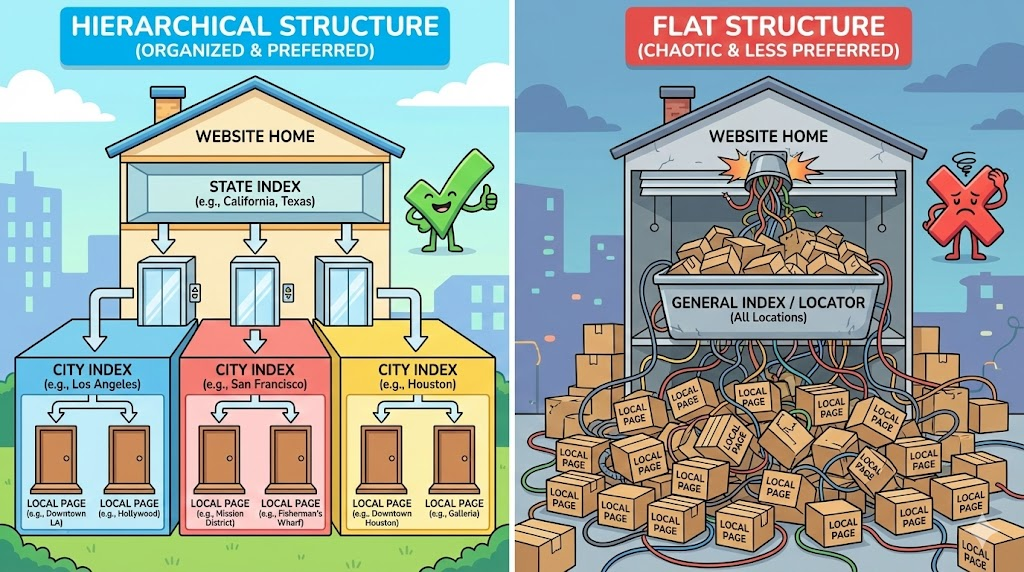
When you build a path like Home > Locations > Texas > Austin > Downtown Store, you are building exactly what Google asks for: a browseable hierarchy. You are helping users narrow down their search geographically, which is a helpful user experience, not a spam tactic.
Why Google Prefers Directories
Beyond avoiding spam signals, a directory-style structure (State > City > Location) helps Google crawl your site more efficiently.
In their SEO Starter Guide, Google advises webmasters to:
“Group topically similar pages in directories. …Specifically, using directories (or folders) to group similar topics can help Google learn how often the URLs in individual directories change.”
When it comes to location pages, “Texas” is a topic. “Austin” is a sub-topic. By grouping your location pages into these directories, you help Google understand the relationship between your stores. A flat structure (listing all 500 locations on one page) destroys this context, making it harder for search engines to segment your site.
Better Breadcrumbs = Better Context
Finally, a hierarchical structure allows for clear breadcrumbs (e.g., Brand > Locations > TX > Austin). Google states that breadcrumbs “help users understand the site hierarchy.” A flat structure cannot provide this depth of context, missing an opportunity to show users (and Google) exactly where a store fits into your larger organization.
Takeaway for Multi-Location Brands
Do not fear the hierarchy. Creating intermediate index pages for States and Cities isn’t spam, it’s digital architecture. It’s the reason the local page team at SOCi has been organizing our customer’s local sites this way for over twenty years. By organizing your locations into a clearly defined, browsable hierarchy, you are aligning your site directly with Google’s guidelines on crawlability and user experience.
You can find more information on what Google does consider “doorway” pages here.