Google Maps Pairs Editorial Summaries with Carousel Photos
April 24, 2026

Share



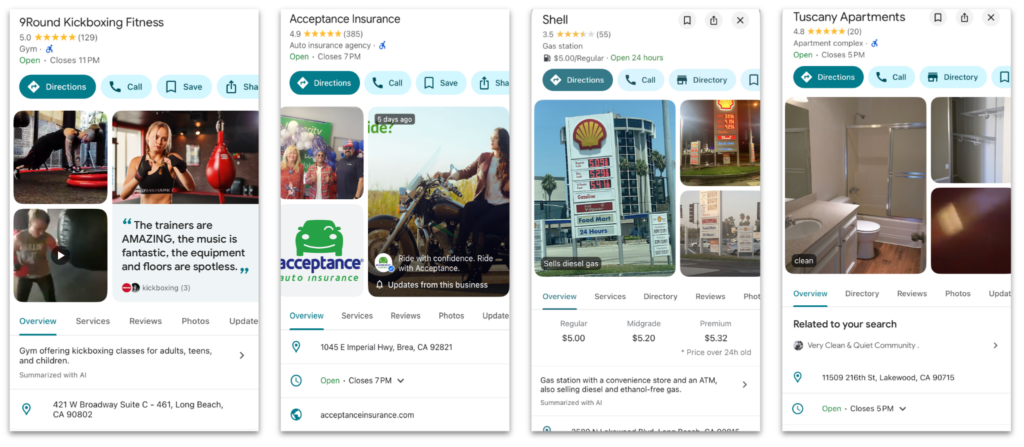
Since last January, Google has been enhancing photo carousels in the Maps app to do more than just display images. They’ve been pairing review snippets, posts, business attributes, and even Place Topic keywords directly with photos, turning this prime real estate into a digital billboard designed to tell the story of your business.
Recently, we noticed a significant new behavior: Google is now pairing a business’s “Editorial Summary” directly with the first photo in that carousel.
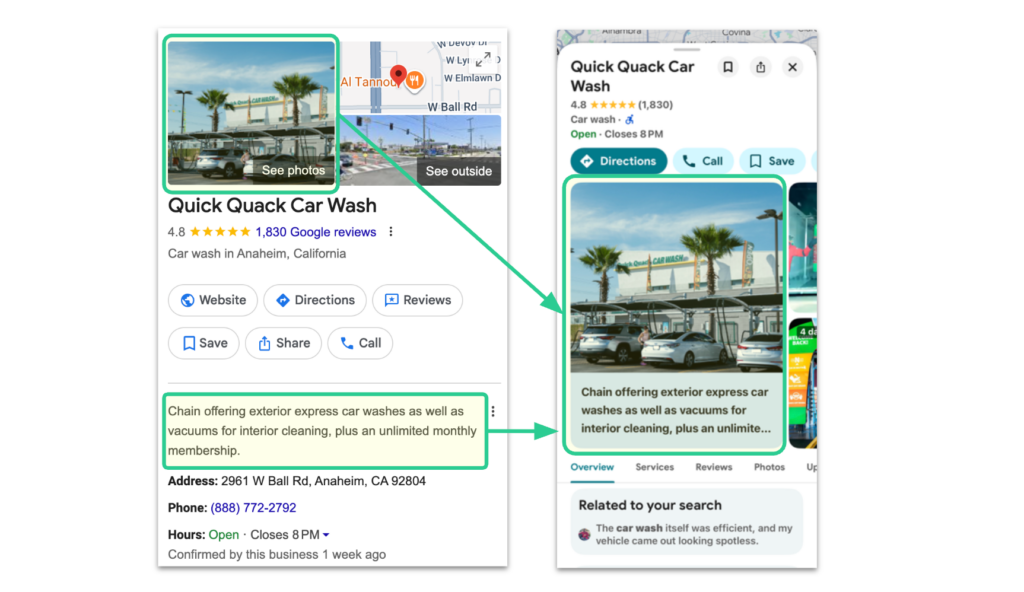
With this summary now serving as the very first thing a potential customer learns about your business, it’s critical to understand exactly what this text is, how Google sources the information to write it, and what you can do if the information is incorrect.
What is an Editorial Summary?
An Editorial Summary is a brief phrase or sentence designed to give users a quick snapshot of a popular business. Rather than listing operational facts, these summaries are meant to capture the essence of a location, such as describing a restaurant as offering “Southwestern fare in a modern setting.”
How are Editorial Summaries generated?
Unlike your standard Business Description, Editorial Summaries are compiled and written by Google’s own “writers” (presumably, AI).
To provide users with a complete picture of a place, Google states that they combine information provided by the business owner with data gathered from relevant sources across the web:
- Crawled Web Content: Publicly available information, such as content pulled directly from a business’s official website.
- Licensed Data: Information gathered from third parties.
- User Contributions: Factual information submitted by users, as well as content such as customer photos and reviews.
- Google’s Interactions: Information based on Google’s own interactions with the local place or business.
Can brands control their Editorial Summary?
No. Unlike the standard Business Description which brands can directly affect through SOCi, Google has explicitly stated that Editorial Summaries cannot be edited in any way.
What if the information in an Editorial Summary is incorrect?
Google’s policy is strict: they will not remove a summary simply because it is negative or unclear. However, Google will remove an Editorial Summary if it describes products or services the business doesn’t actually offer.
If a summary mistakenly claims you offer a product or service you do not, you can request a review directly in the Google Maps app:
- Tap More to the right of the summary.
- Tap Report summary.
- Select the reason you are flagging it (e.g., “Inaccurate”).
- Tap Submit.
What This Means for Multi-Location Brands:
Because this summary is now highly visible on the photo carousel, locked away from manual editing, and written by Google’s team, your overarching data strategy is your best defense. If you want Google to summarize your locations accurately, you have to ensure the data feeding their ecosystem is complete and accurate.
To protect your digital storefront and influence these summaries, multi-location brands should focus on the following:
- Optimize your Local Landing Page Content: Google explicitly uses crawled web content (like your official website) to inform Business Profiles. Ensure that your local landing pages accurately reflect the specific offerings and atmosphere you want associated with your brand. If your website lacks detail, Google’s writers will look to third-party data or user contributions to fill in the blanks.
- Manage User Contributions: Because Google uses user contributions (like photos and reviews) to understand a place, a high volume of quality user-generated content is vital so that Google gets an accurate picture of what you provide.
- Routine Location Audits: With Editorial Summaries now acting as the first touchpoint in the Maps app, marketing teams must regularly audit the mobile search experience across all locations to see what Google’s writers have pinned to their profiles.
- Audit for Service Inaccuracy and Report: Since you cannot edit the text, your only mechanism for removing a bad Editorial Summary is proving it is factually incorrect. Review every location’s summary to ensure it does not list services or amenities that the branch does not provide. If it does, ensure your team uses the Maps app to report the inaccuracy immediately based on Google’s removal criteria.
You can learn more about Google’s Editorial Summaries on GBP and how they are generated here.