OpenAI Delays Ads, Declares “Code Red” to Catch Up with Google

Share


Summary
In this week’s update, learn about OpenAI’s “Code Red” Status, Google’s updates to local search results and Maps features, and a new way to report review extortion attempts.
The News Though OpenAI has been releasing new ChatGPT features at a steady pace in recent weeks, from Instant Checkout to the ChatGPT Atlas browser, it appears that in terms of core LLM functionality the company is currently pacing behind Google. Gemini 3 has outperformed GPT5 in recent benchmarking tests, according to reporting from The Wall Street Journal and The Information. In response, OpenAI CEO Sam Altman has launched an internal “code red” initiative focused on improving ChatGPT’s personalization, speed, and ability to answer a broad range of questions.
Because of this initiative, OpenAI is reportedly delaying the much-anticipated launch of ads in ChatGPT, which had been tested in beta, as well as dedicated AI agents for shopping and healthcare.
Despite the pressure from Google, Nick Turley, the head of ChatGPT at OpenAI, recently noted on LinkedIn that ChatGPT has 70% market share among LLM assistants and (he claimed) a 10% overall share of search. The app has roughly 800 million weekly active users.
What This Means If it wasn’t already obvious, the race for AI platform dominance is mostly a contest between OpenAI and Google. Until now, OpenAI was in the privileged position of defining the state of the art for LLM chatbots, but Google certainly had the technical chops to reach parity, which they’ve now arguably done. Core LLM functionality is, however, only one aspect of what will define success for AI platforms, which are in the midst of defining a new paradigm for consumer behavior and must also compete to release compelling, useful features wrapped in usable interfaces. The contest will be a hot one for the foreseeable future.
Google Integrates Gemini with Maps, Replaces Local Finder with Places Tab
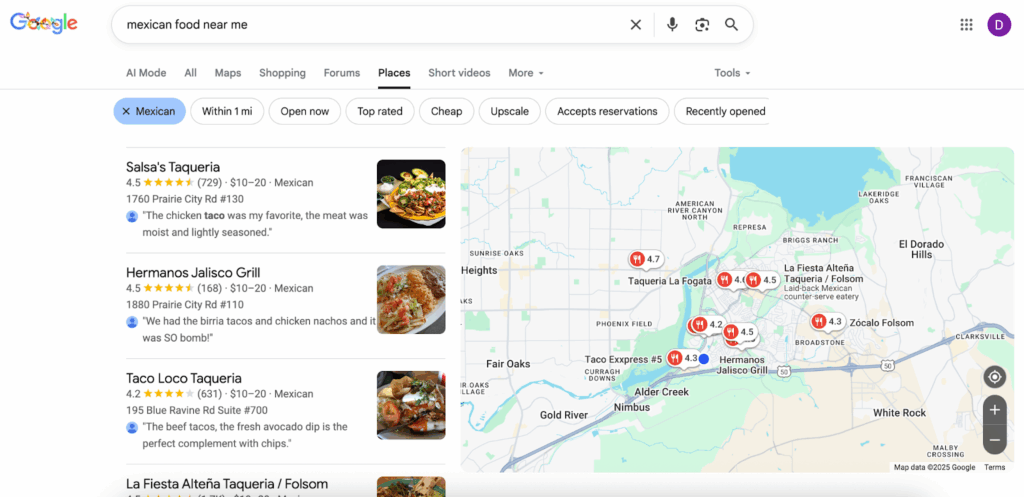
The News Some notable interface changes have occurred recently in Google’s local products. One of these is something that began appearing for some users a while back and now appears to be rolled out globally. For many years, the Google 3-Pack had a button at the bottom that read “More places” or “More businesses” and linked to the Local Finder, an interface that was similar to Google Maps but was considered by Google to be an extension of Search. Now, that same click takes users to a Places tab, which looks a little different, with prominent filter buttons that help users navigate to the listing they want. But as Barry Schwartz has pointed out, the Places tab currently seems to have a bug: you reach a dead end if you try to click at the bottom of that screen to see more listings.
Google has also rolled out some updates that integrate Gemini with Google Maps. Users can now invoke Gemini in order to get help with driving directions, weather updates, and more. Users can also ask for nuanced recommendations of local businesses. The options according to Google’s help documentation are as follows:
- Search:
- Perform searches along your route.
- Find places near you or your destination.
- Example: “Find me a cafe near my destination that serves tiramisu.”
- Refine search results and add stops.
- Place answers:
- Get information about your destination or search results.
- Example: “What’s the most popular dish on the menu?”
- Ask about specific places and landmarks.
- Example: “When does {Place Name} close?”
- Get information about your destination or search results.
What This Means As noted, the Places tab update (which appears both on mobile and desktop) makes it easier for users to filter businesses by particular selection criteria, such as “open now,” “cheap,” “upscale,” or “accepts reservations.” The availability of Gemini in Google Maps will also encourage users to ask for business recommendations using specific criteria that match their needs. Add these updates to the host of reasons why it’s important for businesses to clearly state their points of differentiation in Google profiles, on local landing pages, and elsewhere.
Google’s New Help Page for Reporting Review Extortion
The News An unfortunate trend is the targeting of local businesses by bad actors who post negative reviews and demand payment for removing them. Known as review extortion, this practice is not new, but has ramped up in recent years with the advent of generative AI. Google is responding with a new form called the Merchant Extortion Report Form, which allows businesses to report extortion attempts and upload evidence in the form of screenshots of email communications and the like. Presumably, submitting such a report will lead to expedited action on Google’s part.
What This Means Google advises businesses not to pay extortionists and to report extortion attempts immediately, making sure to gather evidence of fake reviews and requests for payment. Such exploits may be unlikely in the case of multi-location brands, but there are exceptions to every rule and it’s good to be aware of a path to resolve such issues. (Fake reviews that aren’t part of an extortion scheme should be reported using Google’s separate workflow for inappropriate content.)
Related Articles